Turn post-launch feedback into a focused improvement backlog with clear evidence, priorities, owners and acceptance criteria.
Capture the problem before suggesting a fix
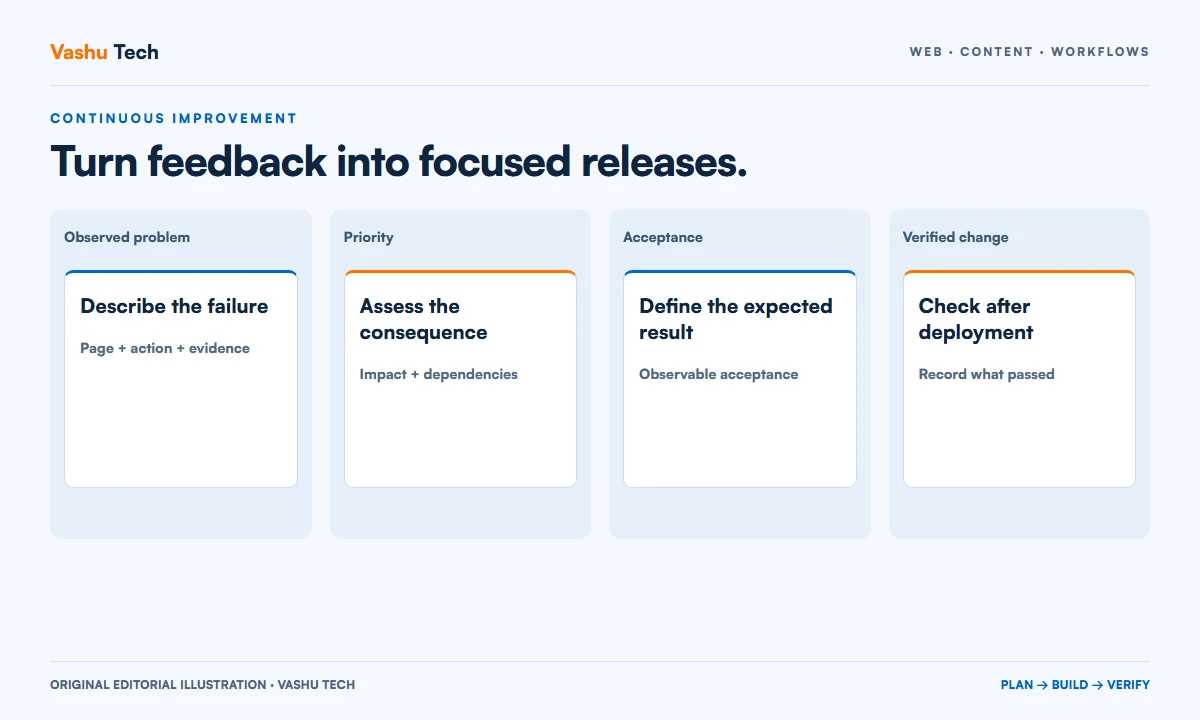
Post-launch requests often arrive as solutions: move a button, add a popup or rebuild a page. Ask what difficulty prompted the request. Record the affected visitor or staff task, the page and a reproducible example. A clear problem statement makes it easier to choose a small change that actually helps.
Separate a confirmed defect from a design preference and a new business requirement. All may deserve attention, but they need different evidence. Avoid treating the loudest piece of feedback as proof that the entire website needs replacement.
Group evidence around user journeys
Several comments may describe the same underlying issue. A missing phone link, unclear service coverage and a confusing form might all affect the enquiry journey. Group related observations while retaining the original examples. This helps the team see whether one focused correction addresses several reports.
Use available evidence responsibly. Support messages, controlled usability checks and authorized analytics can inform a decision, but each has limits. Low traffic alone does not establish a technical defect, and a single successful test does not prove that every visitor has the same experience.
Prioritize by impact and dependency
A broken enquiry workflow generally deserves attention before a minor visual refinement. Consider the number of affected users, business consequence, confidence in the evidence and implementation risk. Include dependencies: a feature cannot be delivered reliably if its content, access or business rule remains undecided.
Keep a small active list with named owners. A large collection of unreviewed ideas is useful for capture but poor for execution. Explain why a request is waiting so the same debate does not restart every week.
Write acceptance before implementation
Describe the intended result in observable terms. For a form issue, specify valid input, expected storage, staff visibility and the customer confirmation. For a layout issue, identify the affected content and viewport sizes. Include the neighbouring workflow that must continue to work.
This does not require an elaborate process for every small change. A concise example can be enough. The purpose is to give the person implementing and the person reviewing the change the same definition of completion.
Close the loop after release
Record what changed, what was checked and any remaining limitation. Review the original problem after the release instead of closing the request solely because code was deployed. When business outcomes take time to assess, assign a later review rather than claiming immediate success.
Vashu Tech can help turn an existing list of website issues into a scoped maintenance or improvement plan. Share the most important examples first so effort goes toward the workflows that matter to your team and customers.
Explore Website Maintenance or discuss your project with Vashu Tech.
Capture enough evidence to reproduce the issue
Ask for the page address, device or browser context, action taken and observed result. Include what the person expected to happen. A screenshot may clarify presentation, while a short sequence of steps helps investigate a workflow failure. Keep sensitive information out of general issue descriptions and use an approved process when private records are relevant.
Distinguish repeated evidence from repeated reports of the same event. Several messages about one failure do not necessarily indicate several independent problems. Group related reports without discarding their context. This helps the team understand impact and avoids opening multiple tasks that compete to change the same underlying component.
Separate defects, improvements and new requirements
A defect means agreed behaviour is failing. An improvement changes an existing experience, while a new requirement adds capability or changes a business rule. The categories help decide what information and approval are needed. They should not be used to dismiss a request, but they prevent a new feature from being estimated as a quick repair.
Write the reason for the classification and revisit it when evidence changes. A request to move a button may reveal an inaccessible control, which deserves a different response from a visual preference. A request for a dashboard may actually be a need for one reliable export. Understanding the problem keeps the proposed solution proportionate.
Prioritize with a small, understandable decision record
Consider the affected task, business consequence, confidence in the evidence and the effort or risk of changing it. Use those factors to explain the order of work. A broken enquiry journey can have a different consequence from a minor alignment issue, even when the visual issue is easier to demonstrate. Keep the reasoning readable rather than hiding it behind an unexplained score.
Include dependencies and unresolved questions. A valuable feature may remain unready because its data owner, account access or business rule is unknown. Assign someone to resolve the dependency instead of repeatedly placing the same task at the top of an impossible schedule. This makes the backlog an operational tool rather than a collection of optimistic promises.
Write a small acceptance example before changing code
Describe the input, action and expected result. For a quote-form problem, identify the required fields, acceptance message and receiving staff workflow. For a content layout issue, identify the long heading or image that causes the problem and the relevant viewport. Concrete examples reduce disagreement about whether the change solved the original request.
Add the nearby behaviour that must remain intact. A change to a shared form component may affect another enquiry path; a global heading rule may affect unrelated pages. Choose checks based on that relationship instead of running every possible test for every change. Verification should be sufficient to address the actual consequence of the implementation.
Worked example: improving a confusing service journey
Imagine a fictional service website receiving feedback that visitors cannot choose between two offers. The backlog item records the questions visitors ask and the pages they encounter. The team first reviews the service descriptions and navigation rather than immediately commissioning a complete redesign. A focused comparison or clearer page hierarchy may address the observed difficulty.
Acceptance asks a reviewer to find the relevant offer from representative entry points and reach an appropriate enquiry action. The release is checked on phone and desktop, and the business decides how later evidence will be assessed. The example illustrates a scoped improvement and does not claim a conversion increase or a result achieved for a particular customer.
Release changes in reviewable groups
Group work when tasks share a component or dependency, but keep the release understandable. A very large collection of unrelated changes makes diagnosis and recovery harder. Record which problems the release is intended to address and which requests remain outside its scope. This gives the business a meaningful account of what is being approved.
After deployment, verify the affected journey in the intended environment. Record the version, result and any limitation. If a business outcome needs time to assess, schedule that review separately rather than marking it successful because the code was published. Technical completion and later operational results are related but different decisions.
Keep the backlog current enough to trust
Assign an owner to review duplicates, stale requests and changes in business priority. Some ideas will no longer be relevant after an offer or process changes. Close them with a reason instead of leaving them indefinitely in a list that appears to be a delivery commitment. Retain useful context so a future request does not restart the same investigation unnecessarily.
Make the active queue small enough for the team to understand. A wider idea list can remain available without being confused with scheduled work. When a new issue is urgent, explain what it displaces and why. This keeps improvement planning transparent and helps limited development effort stay focused on the journeys that matter.
A practical review checklist
- Record the problem, affected task and a reproducible example.
- Separate a defect from a preference or a new business requirement.
- Explain priority using impact, evidence and implementation dependencies.
- Write acceptance and relevant regression checks before implementation.
- Record the release result and any later outcome review separately.
- Maintain a small active queue with named owners and current decisions.
Questions about putting this guide into practice
Should every suggestion become scheduled work?
No. Capture useful suggestions, then assess their evidence, consequence and fit with current priorities. Keep an idea list separate from the active delivery queue. Explain why an item is waiting so capture is not mistaken for a commitment to implement it immediately.
How detailed does a small task need to be?
A short problem statement and one observable acceptance example may be enough. Add detail when permissions, integrations or wider shared components are involved. The aim is a common understanding of completion, not a large process for a reversible wording or spacing change.
When is an improvement complete?
The implementation should satisfy the agreed acceptance checks and be verified in the intended environment. Any later business outcome, such as improved enquiry quality, needs its own evidence and review period. Keep that later assessment distinct from the fact that a change was deployed.
Plan your next step
Discuss a scoped project with Vashu Tech. Share your current website, intended audience and the specific task you want to improve. We can review the starting point, required inputs and acceptance checks before estimating the work.