
Requirements first
Horizontal scrolling, clipped headings, inaccessible menus and awkward form controls prevent visitors from completing ordinary tasks.
Responsive development adapts a website to available screen space and different ways of interacting. It involves more than shrinking a desktop layout: menus, tables, forms, media and touch targets may require different arrangements. The service is useful when a site is difficult to use on phones or when new components have been added without checking other devices. The aim is a coherent journey across sizes, not identical screenshots.
A clear scope, practical review points and communication around your actual requirements.
Horizontal scrolling, clipped headings, inaccessible menus and awkward form controls prevent visitors from completing ordinary tasks.
For Responsive Website Development, agree content ownership, access, approvals and the person who handles questions throughout the project.
Breakpoints should follow content behaviour rather than a list of device brands. Large tables and embedded tools may need dedicated patterns. Tests should cover real content lengths and error messages, because empty demonstration pages can hide layout failures.
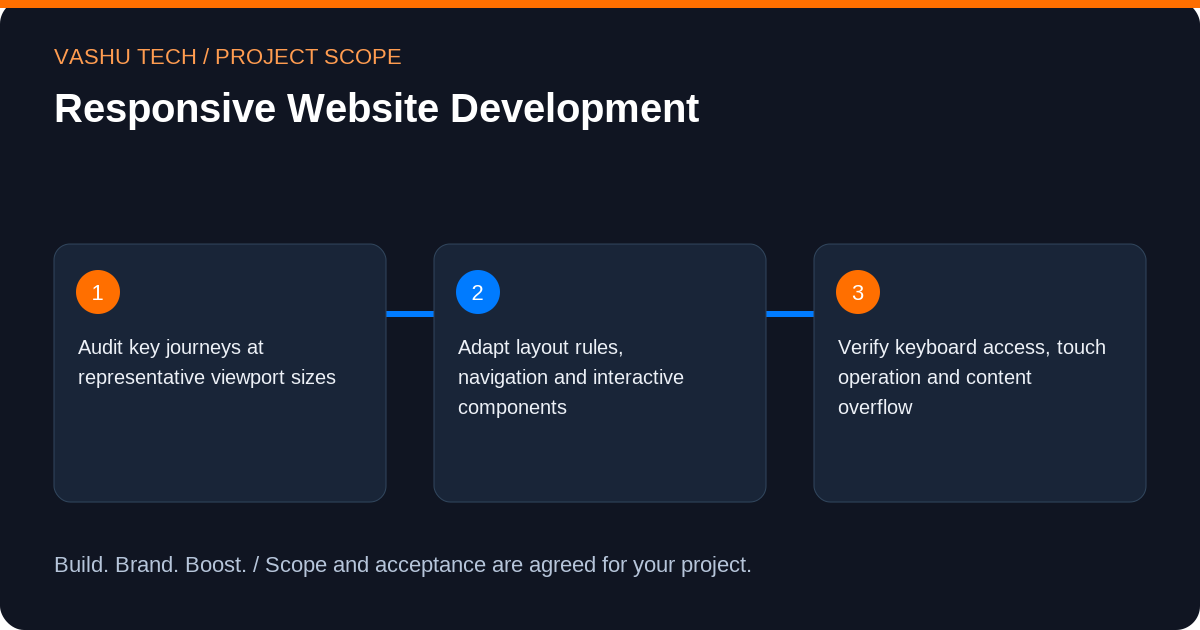
Use the Responsive Website Development tasks as acceptance criteria: Audit key journeys at representative viewport sizes; Adapt layout rules, navigation and interactive components; Verify keyboard access, touch operation and content overflow.
Choose the work relevant to your starting point. Final deliverables are agreed in your proposal.
For Responsive Website Development, this stage covers audit key journeys at representative viewport sizes. Agree the necessary inputs, intended output and review criteria before work starts.
For Responsive Website Development, this stage covers adapt layout rules, navigation and interactive components. Agree the necessary inputs, intended output and review criteria before work starts.
For Responsive Website Development, this stage covers verify keyboard access, touch operation and content overflow. Agree the necessary inputs, intended output and review criteria before work starts.
Horizontal scrolling, clipped headings, inaccessible menus and awkward form controls prevent visitors from completing ordinary tasks.
Breakpoints should follow content behaviour rather than a list of device brands. Large tables and embedded tools may need dedicated patterns. Tests should cover real content lengths and error messages, because empty demonstration pages can hide layout failures.
Check the agreed Responsive Website Development scope against representative examples. Confirm what is delivered, who maintains it and which follow-up tasks are separate.
Five practical stages from initial brief to reviewed handover.
Share the current situation, priority audience and the issue this Responsive Website Development work should address.
Confirm audit key journeys at representative viewport sizes, required inputs, dependencies and the agreed review points.
Carry out the approved scope, including adapt layout rules, navigation and interactive components, with changes reviewed against the brief.
Review page hierarchy, readable content, navigation and contact actions across representative screen sizes.
Confirm acceptance of the Responsive Website Development deliverables, ownership, documentation and any separately agreed ongoing support.
Confirm the included outputs before implementation; optional work is identified separately.
A written Responsive Website Development brief covering the audience, current situation and priority: horizontal scrolling, clipped headings, inaccessible menus and awkward form controls prevent visitors from completing ordinary tasks.
Audit key journeys at representative viewport sizes; Adapt layout rules, navigation and interactive components; Verify keyboard access, touch operation and content overflow.
Review page hierarchy, readable content, navigation and contact actions across representative screen sizes.
Breakpoints should follow content behaviour rather than a list of device brands. Large tables and embedded tools may need dedicated patterns. Tests should cover real content lengths and error messages, because empty demonstration pages can hide layout failures.
Check the agreed Responsive Website Development tasks using real or approved representative examples, including relevant failure cases.
Confirm who maintains the result, how access is handed over and which improvements or support are outside the initial Responsive Website Development agreement.
Choose the checks relevant to your Responsive Website Development project; no ranking or business result is promised.
Where Responsive Website Development affects public pages, organize accurate headings, service descriptions and useful links around the intended audience.
Review page hierarchy, readable content, navigation and contact actions across representative screen sizes. Where applicable, include keyboard access, readable text and mobile interaction checks.
Agree how Responsive Website Development work is evaluated. Separate implementation evidence from traffic, enquiries or sales, and configure analytics only where approved.
Discuss how Responsive Website Development fits your audience, workflow and operational requirements.
Responsive development adapts a website to available screen space and different ways of interacting. It involves more than shrinking a desktop layout: menus, tables, forms, media and touch targets may require different arrangements. The service is useful when a site is difficult to use on phones or when new components have been added without checking other devices. The aim is a coherent journey across sizes, not identical screenshots.
A website project starts with the tasks visitors need to complete. Design explains the information and interactions; development makes those decisions work reliably. New websites, redesigns, focused landing pages and corrective work have different starting points. Share the existing site, intended audience and practical problem before choosing a solution. A focused bug fix should not become an unnecessary rebuild, while a new business website needs a coherent content structure rather than a collection of disconnected screens.
Horizontal scrolling, clipped headings, inaccessible menus and awkward form controls prevent visitors from completing ordinary tasks.
These stages describe the discussion scope for this service. The proposal should identify which outputs are included, the information required from you and any work that belongs to a separate agreement. Review points should make it possible to check the result against the original requirement.
Breakpoints should follow content behaviour rather than a list of device brands. Large tables and embedded tools may need dedicated patterns. Tests should cover real content lengths and error messages, because empty demonstration pages can hide layout failures.
The practical value is addressing this specific difficulty: horizontal scrolling, clipped headings, inaccessible menus and awkward form controls prevent visitors from completing ordinary tasks. A useful result makes the relevant journey or operational responsibility clearer. Define the acceptance checks around verify keyboard access, touch operation and content overflow, and distinguish an implemented improvement from an unverified business outcome.
An estimate depends on the existing environment, the amount of content or data involved and the agreed testing and access requirements. External licences, hosting and vendor subscriptions should be identified separately. Share any deadline and its dependencies so that feasibility can be assessed; this page does not promise a fixed price or delivery date.
Describe the current situation and the change you need. A public website link and a short explanation are enough to begin; arrange sensitive access separately. Request a scoped quote or contact Vashu Tech to discuss the next step.
A useful website brief connects page design to visitor decisions. Identify what someone needs to understand before making contact, then decide how navigation, copy, visual hierarchy and forms should support that journey. Keep essential company information easy to find on a phone as well as a larger screen.
For Responsive Website Development, start by identifying the decision or workflow you want to improve. Horizontal scrolling, clipped headings, inaccessible menus and awkward form controls prevent visitors from completing ordinary tasks. Select the tasks that address that requirement; the full category of work does not have to be included in every project.
Useful starting information includes your current public website, approved brand materials, a draft page list, available copy and the enquiry destination. Public links and redacted examples are enough for an initial discussion. Account access can be arranged separately after the required permissions are understood.
Consider a service business whose offer is spread across several pages. A practical brief could make the service differences easier to compare, give each page a clear next step and check whether a visitor can complete an enquiry without losing entered information.
Translate that example into a small, testable brief for Responsive Website Development: begin with audit key journeys at representative viewport sizes, identify the inputs needed to adapt layout rules, navigation and interactive components, and agree how to verify keyboard access, touch operation and content overflow. This is an illustrative planning scenario, not a client case study or a promised result.
Review representative pages at phone, tablet and desktop widths. Try keyboard navigation, long headings, missing images and invalid form input, alongside a successful submission. Where URLs change, review the redirect mapping and retained public information rather than judging the work by screenshots alone.
Keep a short acceptance checklist alongside the proposal. For this scope, the review should include: Audit key journeys at representative viewport sizes; Adapt layout rules, navigation and interactive components; Verify keyboard access, touch operation and content overflow. Record what was checked, which items remain open and who can approve the result. An implemented change and a business outcome are different things; neither enquiries nor sales should be assumed from a technical demonstration.
The handover can identify the reusable layouts, editable content areas and the approved contact routes. Agree which source files or implementation notes are included and who will maintain hosting, content and future page changes.
Before handover, agree who owns the accounts, approves public information and handles future changes. Any maintenance, additional content, third-party subscription or ongoing campaign management should be listed explicitly in the proposal. Share an essential deadline early so dependencies can be discussed before a delivery schedule is agreed.
Responsive Website Development should be scoped around the part of the business journey that needs attention. Horizontal scrolling, clipped headings, inaccessible menus and awkward form controls prevent visitors from completing ordinary tasks. Describe the starting point before deciding whether the work requires a focused change, a new implementation or a wider review. Existing content, records and useful behaviour should be identified before any change is approved.
Review the message hierarchy, section order and relationship between pages before selecting decorative treatments. A visitor needs to understand the offer, assess relevant information and reach a useful action. Include actual headings, images and contact content in the design review. Long text, small screens and missing optional media should be considered early. The design should support the explanation rather than relying on motion or oversized headings to fill content gaps.
Useful inputs include the current public website, a page list, approved service descriptions, logo files and licensed images. Identify the priority visitor action and explain which pages are confusing or incomplete. Bring examples of the direction you prefer, but identify the specific qualities that matter rather than asking for a copy of another business website. Confirm which content exists, which needs writing and who approves it.
Identify the person who can approve public information and the person responsible for the operational result. Share public URLs and redacted examples first. Arrange sensitive access separately with suitable permissions. If there are deadlines, explain the event behind them and any approvals still needed. Ready content and verified account access can change the practical scope; they should be discussed before confirming the implementation plan.
A hypothetical service business has accurate information but presents every service in one long paragraph. A focused project can define separate page purposes, improve heading hierarchy and connect each scope to a relevant enquiry. The review uses real service copy and long headings so responsive behaviour is checked before the layout is accepted.
For this service, adapt the example to Audit key journeys at representative viewport sizes; Adapt layout rules, navigation and interactive components; Verify keyboard access, touch operation and content overflow. Identify the starting behaviour, expected change and the check that demonstrates the result. These are hypothetical planning situations, not claims about Vashu Tech clients or results. A useful example narrows the discussion to real requirements without assuming that every business needs the same features or the same amount of work.
Check readable heading and body sizes, image treatment, section spacing and important actions at representative phone, tablet and desktop widths. Review keyboard navigation and visible focus. Verify link destinations and the actual form result where submissions are included. Test content editing with the person who will maintain the site. A visual review and a functional review answer different questions and both should be recorded.
Use a written checklist with a requirement, expected result and evidence for each important task. Include representative data and exceptions as well as the successful demonstration. Where work affects a visitor action, review the staff or administrative outcome too. Separate local verification, an authorised live release and ongoing operation. Record external-provider checks honestly instead of presenting entered configuration as proof that a real service has completed its work.
Clarify whether the scope concerns presentation, content, development or a combination. Domain and hosting work, photography, extensive copywriting and third-party systems should not be assumed from the page design alone. Search-ready structure can be included where agreed, but rankings, traffic and enquiries are not guaranteed. Retained URLs and records should be reviewed before a redesign or migration is approved.
The proposal should distinguish the initial outputs from content writing, new integrations, additional pages and ongoing support that are not included. Confirm ownership of accounts and files, documentation, ordinary editing tasks and the process for future changes. Agree how new requirements affect the estimate and schedule. Handover should make the result understandable to the responsible team, with unresolved dependencies recorded and a clear next step for each.
Audience, scope and coordination for Responsive Website Development.
Businesses evaluating Responsive Website Development for a new requirement or an existing website. Horizontal scrolling, clipped headings, inaccessible menus and awkward form controls prevent visitors from completing ordinary tasks.
Audit key journeys at representative viewport sizes Adapt layout rules, navigation and interactive components Verify keyboard access, touch operation and content overflow Scope, exclusions and acceptance evidence are agreed in the proposal.
Answers to help you plan the scope and next steps.
No. Responsive layouts preserve meaning and functionality while changing arrangement to suit the available space and input method.
Include the affected website or proposed project, the audience and the outcome you need. For this work, useful discussion points include audit key journeys at representative viewport sizes, adapt layout rules, navigation and interactive components, verify keyboard access, touch operation and content overflow. Do not send passwords in the public form.
The amount of existing work to inspect, the agreed deliverables, access readiness and testing requirements affect the estimate. Breakpoints should follow content behaviour rather than a list of device brands. Large tables and embedded tools may need dedicated patterns. Tests should cover real content lengths and error messages, because empty demonstration pages can hide layout failures. Ask for a scoped proposal rather than assuming a fixed package or completion date.
Acceptance should reflect the actual requirement: audit key journeys at representative viewport sizes; adapt layout rules, navigation and interactive components; verify keyboard access, touch operation and content overflow. Check representative content and failure cases as well as the expected successful result. Agree the evidence and handover responsibilities before work begins.
Bring your current public website, approved brand materials, a draft page list, available copy and the enquiry destination. Identify your priority and which tasks you need: Audit key journeys at representative viewport sizes; Adapt layout rules, navigation and interactive components; Verify keyboard access, touch operation and content overflow. Share public or redacted information first; arrange sensitive access separately.
The handover can identify the reusable layouts, editable content areas and the approved contact routes. Agree which source files or implementation notes are included and who will maintain hosting, content and future page changes. Confirm account ownership, approval responsibilities and any ongoing support separately from the initial work.
Share your starting point and priorities. We can discuss the scope, required information and acceptance checks before providing an estimate.
Start a conversation
Send your requirements to our team. Please leave out passwords and confidential access details.